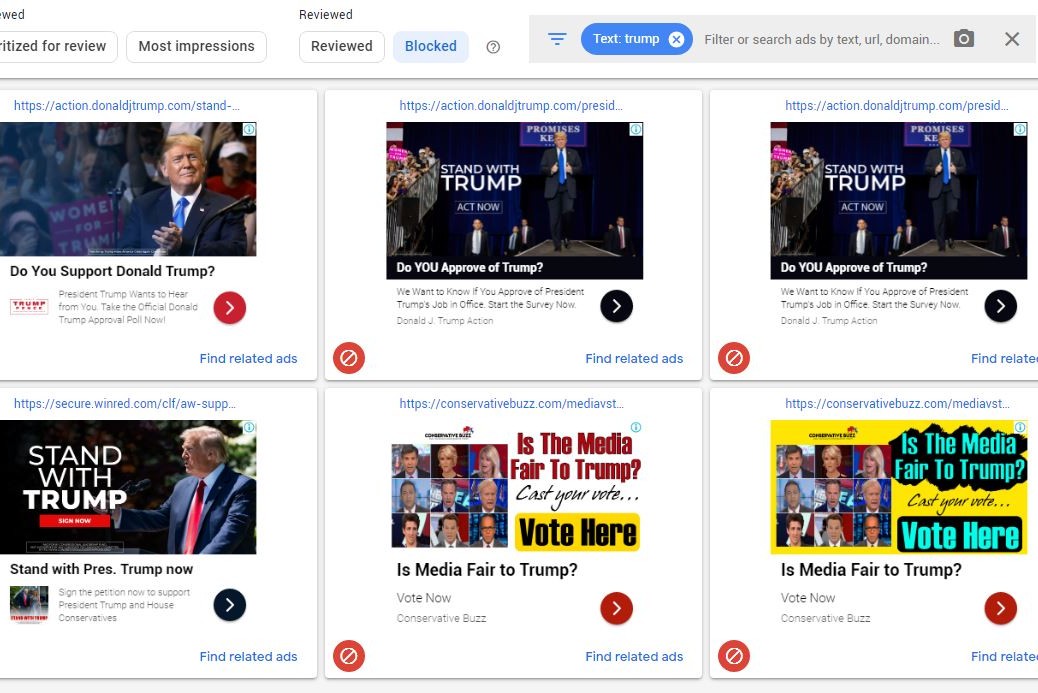
If you are a contractor with a business page and are displaying Google ads anywhere on your site, you probably saw that most of the ads shown recently are for a survey asking if you approve of Donald J. Trump as President, or some other nonsensical survey or annoying ad from the “conservative” political party. If you’re like the majority of true U.S. citizens that have had enough of this and want to remove annoying Trump ads from your site, here is how I did it:
In your Google AdSense dashboard, click on the 3-line “hamburger” in the upper left hand corner of the web page, right before the Google AdSense Logo, to open the side menu.

Scroll down and click on to “Blocking Controls”, then click “Domains(search)”, All sites.
You’ll see “Advertiser URLs – Prevent ads from individual advertisers” , beneath that click on “Manage Advertiser Urls” and enter these URL’s:
conservativebuzz.com
secure.donaldjtrump.com
www.donaldjtrump.com

Conservativebuzz.com is responsible for many of the annoying Trump survey ads, the other two are official Trump campaign URL’s.

That should remove all Trump political ads from your Adsense campaigns on your website. To be sure you find them all, in that same left menu click on Blocking Controls->Content->Ad Review Center and in the search bar in the top right menu type in “Trump”. Block whatever ads appear in those search results simply by clicking the red blocking icon on each ad.
Don’t forget to vote. God Bless America.